
Matrox QuadHead2Go Series
Scalable. Flexible. Easy-to-Deploy Video Wall.

Build and customize rectangular and artistic walls of any size, shape or configuration
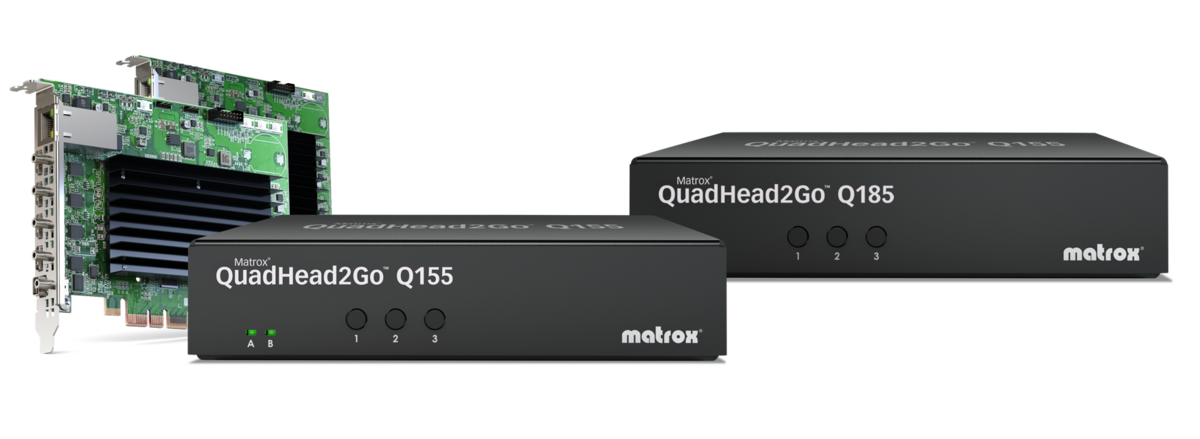
Matrox® QuadHead2Go™ multi-monitor controller cards and appliances make building dynamic, next-generation video walls of any type and size simple. Available in DisplayPort™ (QuadHead2Go Q185) and HDMI® (QuadHead2Go Q155) input models, OEMs, system integrators, and AV professionals can leverage QuadHead2Go to drive up to four displays from a single source to quickly and easily add more screens to video rectangular and artistic walls.

HDCP Compliant

Discover QuadHead2Go Multi-Monitor Controllers
Power four pristine quality Full HD displays from a single 4Kp60 video source—of up to 4Kp60 or 8Kx8K—at Full RGB 8:8:8 and YUV 4:4:4 color
Design simple rectangular and artistic video wall layouts with free rein – each output can have its own resolution, be independently rotated, cropped, upscaled, downscaled, and positioned anywhere
Drive up to 64 x 1920x1080p60 displays by pairing D-Series quad-4K graphics cards with multipleQuadHead2Go devices monitor controllers
What others are saying about the QuadHead2Go Series
"The goal of the QuadHead2Go is to make several display devices look like a single pure image. I am putting the QuadHead2Go at the top of my recommended products list."

“The QuadHead2Go is a great option for content distribution or as a straightforward plug-and-play video wall, the default configuration being 2x2. Its scalability makes it capable of handling just about any video wall setup you could want.”

"The QuadHead2Go checks off all the videowall matrix boxes. It is scalable, easy-to-implement, easy-to-use plus reliable, and easy-to-maintain. It comes from an iconic company founded on engineering and service and best of all it solves problems for both integrators and end users alike."

Frequently Asked Questions
- Does the Matrox PowerWall software require a dedicated host system to run continuously?
No. Matrox PowerWall is a complimentary Windows-based software used solely for the initial configuration and layout design of your video wall. Once your configurations are saved to the QuadHead2Go device, the software can be closed, and the unit operates completely standalone as a system-independent hardware controller. - Can I integrate QuadHead2Go into custom control systems or AV networks?
Yes. For developers and integrators who prefer not to use PowerWall, QuadHead2Go supports a comprehensive REST API. This allows you to build custom control interfaces, script automated layout changes, perform device monitoring to check system status, and manage the devices directly at the network level. - Are QuadHead2Go controllers TAA compliant?
Yes. We offer specific TAA-compliant SKUs for both the Q155 and Q185 multi-monitor controller appliances, making them fully eligible for government, military, and federal control room deployments. - How does the device handle HDCP-protected content?
QuadHead2Go is fully HDCP compliant. It can securely capture and display HDCP-protected content from digital signage players, set-top boxes, and other secure HDMI or DisplayPort video sources without interrupting the signal chain. - How scalable is the QuadHead2Go architecture for large-scale video walls?
Highly scalable. While a single QuadHead2Go unit drives up to four 1080p60 displays from a single 4Kp60 signal, integrators can pair multiple QuadHead2Go units with graphics cards such as the Matrox LUMA Pro Series. This combined architecture can seamlessly drive up to 64 Full HD (1920x1080p60) displays from a single system. - How do I book a demo or purchase QuadHead2Go units?
To see the hardware in action, discuss your specific deployment architecture, or inquire about pricing and purchasing options, simply fill out the form on this page. One of our Matrox Video AV experts will review your requirements and reach out to assist you directly. - We are located outside of North America. How do we get in touch?
Matrox Video has a massive global footprint with sales offices, distributors, and certified integration partners located all over the world. Simply fill out the "Book a Demo" form on this page with your country details, and our regional team will get back to you shortly to discuss your project and help design your workflow. - What are the physical connection differences between the appliance and PCIe card models?
The physical connectivity depends on the form factor. The standalone appliance models (Q155 and Q185) utilize standard, full-size HDMI and DisplayPort inputs and outputs. The single-slot PCIe card models are designed for high-density systems and utilize mini-HDMI and mini-DisplayPort connections.
Ready to build versatile video walls?

- Matrox Video
- Global Headquarters
- 1055 St. Regis Blvd.
- Dorval, Quebec
- Canada H9P 2T4
- 1-800-361-4903


Matrox Video is a global leader in video technology. Featuring a complete portfolio of best-in-class hardware, software, APIs, and SDKs, Matrox Video enables OEMs, system integrators, value-added channel partners, and end users to push the boundaries of video innovation. Serving the AV/IT, broadcast, and emerging markets for over 45 years, Matrox Video is synonymous with quality, performance, interoperability, and support. Matrox Video’s legal entity is Matrox Graphics Inc., part of the Matrox Group.